

Are you preparing for the upcoming Computer Operator or Assistant Computer Operator exams? If yes, you already know that a massive chunk of your score depends directly on your speed and accuracy in Multiple Choice Questions (MCQs).
To help you clear your Lok Sewa (Public Service Commission) exams with flying colors, we have curated a comprehensive Computer Operator MCQ 50-Question. This mock test directly follows the latest official syllabus, broken down systematically from Easy to Medium, and finally Hard (Advanced) conceptual levels.
Before diving into the questions, make sure you have thoroughly reviewed the Official Computer Operator Syllabus and checked the Latest Lok Sewa Vacancies to track your exam deadlines.
Test your technical skills below and count how many you get right!
🎯 Try the Interactive Syllabus Practice Tool
Before tackling the 50 major questions below, use this quick interactive tool to review key concepts across the four main pillars of your examination syllabus. Select a topic to quickly view critical exam facts:
Computer Operator MCQ, Lok Sewa Computer Operator Questions, Computer Operator Syllabus Quiz, Computer Fundamentals MCQ PDF, Sarkari Jagir Computer Quiz , Operating system commands MCQ, ASCII and Unicode quiz, Windows GUI questions, Lok sewa computer questions with answers, Computer operator model questions
🟢 Phase 1: Easy Level (Questions 1–15)
These questions cover core basic terminology, standard input/output devices, and foundational Windows features.
1. Which generation of computers used vacuum tubes as their primary electronic component?
A) Second Generation
B) First Generation
C) Third Generation
D) Fourth Generation
View Answer
B) First Generation
2. What is the full form of CPU?
A) Computer Processing Unit
B) Central Processing Unit
C) Control Processing Unit
D) Central Program Utility
View Answer
B) Central Processing Unit
3. Which of the following is an example of an input device?
A) Monitor
B) Printer
C) Keyboard
D) Speaker
View Answer
C) Keyboard
4. What type of memory is RAM (Random Access Memory)?
A) Auxiliary Memory
B) Secondary Memory
C) Primary Memory
D) Tertiary Memory
View Answer
C) Primary Memory
5. Which of the following is considered the “brain” of the computer?
A) RAM
B) Hard Disk
C) CPU
D) Monitor
View Answer
C) CPU
6. What is a collection of facts and figures in an unorganized form called?
A) Information
B) Data
C) Knowledge
D) Program
View Answer
B) Data
7. Which of the following is system software?
A) MS Word
B) Adobe Photoshop
C) Operating System
D) VLC Media Player
View Answer
C) Operating System
8. What does a file extension usually indicate?
A) The size of the file
B) The location of the file
C) The file format or type
D) The date the file was created
View Answer
C) The file format or type
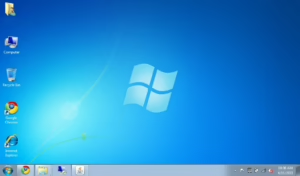
9. In Windows, deleted files are temporarily stored in the:
A) Control Panel
B) My Documents
C) Recycle Bin
D) Taskbar
View Answer
C) Recycle Bin
10. What is the shortcut key to copy a selected item in Windows?
A) Ctrl + X
B) Ctrl + V
C) Ctrl + C
D) Ctrl + Z
View Answer
C) Ctrl + C
11. Which of the following is a text file extension?
A) .mp3
B) .txt
C) .jpg
D) .exe
View Answer
B) .txt
12. The bar that sits at the bottom of the Windows desktop by default is called the:
A) Menu Bar
B) Title Bar
C) Status Bar
D) Taskbar
View Answer
D) Taskbar
13. Which tool in Windows is used to paint or draw simple graphics?
A) MS Word
B) Notepad
C) MS Paint
D) Control Panel
View Answer
C) MS Paint
14. What does GUI stand for?
A) General User Interaction
B) Graphical User Interface
C) Guided User Interface
D) Graphical Utility Information
View Answer
B) Graphical User Interface
15. Which of the following is a component of Multimedia?
A) Text
B) Audio
C) Video
D) All of the above
View Answer
D) All of the above
🟡 Phase 2: Medium Level (Questions 16–35)
This section tests your understanding of data processing mechanics, storage hardware layout, and CLI operations.
16. Which computer characteristic prevents it from feeling tired or bored after working for hours?
A) Accuracy
B) Speed
C) Diligence
D) Versatility
View Answer
C) Diligence
17. What is software embedded directly into hardware devices, like a BIOS chip, called?
A) Application Software
B) Shareware
C) Firmware
D) Freeware
View Answer
C) Firmware
18. High-speed volatile memory placed between the CPU and RAM to speed up processing is known as:
A) Auxiliary Memory
B) Flash Memory
C) Cache Memory
D) Virtual Memory
View Answer
C) Cache Memory
19. How many bits are typically used in a standard ASCII character encoding scheme?
A) 4 bits
B) 7 or 8 bits
C) 16 bits
D) 32 bits
View Answer
B) 7 or 8 bits
You May Also Like:
Computer Operator Old Questions
Computer Operator Pratical Questions
Computer Operator Model Questions
Computer Operator Past Questions
20. Which encoding standard was developed to represent characters from almost all written languages in the world?
A) ASCII
B) EBCDIC
C) Unicode
D) BCD
View Answer
C) Unicode
21. In a hard disk, concentric circles on the disk surface are called:
A) Sectors
B) Tracks
C) Clusters
D) Cylinders
View Answer
B) Tracks
22. Which command in the Windows Command Prompt (CMD) is used to change the current directory?
A) DIR
B) MD
C) CD
D) RD
View Answer
C) CD
23. What is the primary purpose of the ATTRIB command in CLI?
A) To delete files permanently
B) To view and modify file attributes (like hidden or read-only)
C) To format a disk drive
D) To copy system files
View Answer
B) To view and modify file attributes (like hidden or read-only)
24. Which type of operating system allows multiple users to access a single system simultaneously?
A) Single-user, Single-tasking
B) Real-time Operating System
C) Multi-user Operating System
D) Batch Processing System
View Answer
C) Multi-user Operating System
25. Which system tool rearranges fragmented data on your hard drive so it can work more efficiently?
A) Disk Cleanup
B) Disk Defragmenter
C) Backup and Restore
D) System Restore
View Answer
B) Disk Defragmenter
26. To launch the “Run” dialog box in Windows, which key combination is used?
A) Windows Key + R
B) Windows Key + E
C) Ctrl + Alt + Del
D) Windows Key + D
View Answer
A) Windows Key + R
27. Which tool in Windows Control Panel would you use to safely uninstall a software application?
A) Administrative Tools
B) Programs and Features
C) System and Security
D) Ease of Access center
View Answer
B) Programs and Features
28. What is the fundamental function of an Operating System’s kernel?
A) Managing file extensions
B) Acting as an interface between applications and data processing at the hardware level
C) Providing a user interface like the desktop
D) Compiling high-level programming languages
View Answer
B) Acting as an interface between applications and data processing at the hardware level
29. Which language does the computer understand directly without any translation?
A) High-Level Language
B) Assembly Language
C) Machine Language
D) 4GL (Fourth Generation Language)
View Answer
C) Machine Language
30. What converts an entire high-level program into machine language at once before execution?
A) Interpreter
B) Assembler
C) Compiler
D) Linker
View Answer
C) Compiler
31. What is the extension of an executable installation file in Windows?
A) .dll
B) .sys
C) .exe
D) .bat
View Answer
C) .exe
32. Which of the following is considered an auxiliary (secondary) storage device?
A) ROM
B) Cache
C) Hard Disk Drive (HDD)
D) Registers
View Answer
C) Hard Disk Drive (HDD)
33. The process of preparing a storage disk for data storage by erasing existing data and creating file systems is called:
A) Defragmenting
B) Scanning
C) Formatting
D) Restoring
View Answer
C) Formatting
34. In Windows Explorer, what is the fastest way to create a shortcut icon on the desktop for a specific file?
A) Right-click file -> Send to -> Desktop (create shortcut)
B) Drag and drop the file with the Shift key pressed
C) Double-click the file
D) Rename the file extension to .lnk
View Answer
A) Right-click file -> Send to -> Desktop (create shortcut)
35. Which tool helps to look up special characters or symbols that aren’t readily available on your keyboard?
A) Device Manager
B) Paint
C) Character Map
D) Disk Cleanup
View Answer
C) Character Map
🔴 Phase 3: Hard / Advanced Level Computer Operator (Questions 36–50)
Warning: These questions feature tricky technical nuances, complex system concepts, and hidden command attributes commonly targeted by Lok Sewa examiners.
36. In a physical disk structure, what is a “Cluster”?
A) A single track on the disk
B) A collection of logical sectors treated as a single allocation unit
C) The physical mechanical arm of the drive
D) The speed at which the disk spins
View Answer
B) A collection of logical sectors treated as a single allocation unit
37. Which CLI command is used to change a file named old.txt to new.txt?
A) MOVE old.txt TO new.txt
B) REN old.txt new.txt
C) CHANGE old.txt new.txt
D) ATTRIB old.txt -r new.txt
View Answer
B) REN old.txt new.txt
38. What type of programming language translator converts code line-by-line and stops immediately if it encounters an error?
A) Compiler
B) Interpreter
C) Linker
D) Assembler
View Answer
B) Interpreter
39. If you want to view hidden system files using the command line, which parameters would you add to the DIR command?
A) DIR /p
B) DIR /w
C) DIR /ah
D) DIR /s
View Answer
C) DIR /ah
40. Which of the following represents a major operational difference between ASCII-8 and Unicode (specifically UTF-16)?
A) ASCII can represent more characters than UTF-16.
B) UTF-16 uses 16 bits per character allowing up to 65,536 base characters, while ASCII-8 is limited to 256.
C) ASCII is used for graphics, while Unicode is only used for text.
D) Unicode does not support English alphabets.
View Answer
B) UTF-16 uses 16 bits per character allowing up to 65,536 base characters, while ASCII-8 is limited to 256.
41. What type of operating system architecture is designed to respond to events within a strict, predictable time constraint?
A) Time-sharing OS
B) Real-Time Operating System (RTOS)
C) Network Operating System
D) Distributed Operating System
View Answer
B) Real-Time Operating System (RTOS)
42. While using the command line, what happens if you run the command COPY *.txt D:\Backup?
A) It copies the entire folder structure to D drive.
B) It copies only the files whose names are exactly “*.txt”.
C) It copies all files with a .txt extension from the current directory to D:\Backup.
D) It deletes text files from the current directory.
View Answer
C) It copies all files with a .txt extension from the current directory to D:\Backup.
43. Which of the following Windows administrative tools provides an interface to configure hardware devices and update system drivers?
A) Task Manager
B) System Information
C) Device Manager
D) Resource Monitor
View Answer
C) Device Manager
44. What is the fundamental difference between data and information?
A) Data is processed information, whereas information is raw facts.
B) Data is unorganized raw facts, whereas information is processed, structured, and meaningful data.
C) Data always takes up more storage space than information.
D) There is no difference; they are synonymous.
View Answer
B) Data is unorganized raw facts, whereas information is processed, structured, and meaningful data.
45. Which of the following is true regarding Cache Memory level structures (L1, L2, L3)?
A) L3 cache is faster and smaller than L1 cache.
B) L1 cache is built directly into the CPU core and is the fastest, while L3 is typically shared and slower than L1.
C) L2 cache is always non-volatile memory.
D) Cache memory has a higher storage capacity than RAM.
View Answer
B) L1 cache is built directly into the CPU core and is the fastest, while L3 is typically shared and slower than L1.
46. In the Windows CLI, how do you set a file named report.docx to be Read-Only and Hidden simultaneously?
A) ATTRIB report.docx +r +h
B) SET report.docx readonly hidden
C) ATTRIB report.docx -r -h
D) MOVE report.docx /hide /readonly
View Answer
A) ATTRIB report.docx +r +h
47. Which of the following types of memory must be constantly refreshed thousands of times per second to retain its data?
A) SRAM (Static RAM)
B) DRAM (Dynamic RAM)
C) ROM (Read-Only Memory)
D) EPROM
View Answer
B) DRAM (Dynamic RAM)
Don’t missed to check these topic
Computer Operator (31) First Paper (14) General Knowledge (14) Government Job (47) Kharidar (11) Lok Sewa Aayog (17) Nayab Subba (10) Nepal Bank Ltd. (9) Officer First Paper (7) Old Question (8) Old Questions (52) Province Public Service Commission (19) Public Service Commission (62) Rastriya Banijya Bank (9) Result (11) Section officer (35) Sifaris (7) Syllabus (25) Vacancy (71) Written Exam (48)
48. What is the primary purpose of a “System Restore” point in Windows?
A) To back up user documents, photos, and music files.
B) To roll back system files, registry keys, and installed programs to a previous working state without affecting user data.
C) To clear temporary internet files and free up disk space.
D) To format the primary partition automatically.
View Answer
B) To roll back system files, registry keys, and installed programs to a previous working state without affecting user data.
49. Hybrid computers are computers that exhibit features of:
A) Mainframe and Mini computers
B) Micro and Macro computers
C) Analog and Digital computers
D) Laptop and Desktop computers
View Answer
C) Analog and Digital computers
50. What does the term “Spooling” (Simultaneous Peripheral Operations On-Line) refer to in an Operating System?
A) A process of clearing out the cache memory.
B) Temporary storage used to hold data sent to a slower device (like a printer) so the CPU can move on to other tasks.
C) Encrypting files before transmitting them across a network.
D) Checking the hard drive for errors during system boot-up.
View Answer
B) Temporary storage used to hold data sent to a slower device (like a printer) so the CPU can move on to other tasks.